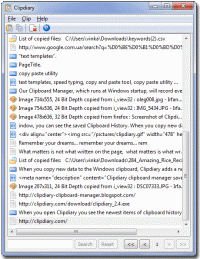
Clipdiary is a clipboard manager for keeping the clipboard history. Install our clipboard utility and you will never lose data once copied. Clipdiary will record everything you place to clipboard into database and you can easy copy data back
The contents of the Windows clipboard constantly change as you use it to copy and paste various information. But your data isn't stored for a long time - when you turn off the computer or just copy some other text, the data is lost. Usually, that isn't a big problem, but have you ever needed the data you copied 30 minutes or an hour ago? Maybe your computer is hanging and the program hasn't saved the data. Or you may simply want to recall what you were doing at the computer a month or a year ago. There are many cases in which you might want to restore your clipboard content. We suggest a nice solution.
Install our clipboard utility and you will never lose data once copied. This clipboard utility, which runs on Windows startup, will record everything placed on the clipboard into the database. All you have to do is press the Hot key combination or click the program icon in the system tray.
Clipdiary can log clipboard history and record data in several formats: plain text, RTF (Rich Text Format) and images (BMP), html, files and so on. So, besides saving parts of text, you can easily make series of screenshots, and Clipdiary will save them for you.
Why not try it?
Requirements:not
Operating system:Windows XP / Vista / 7 / 8 / 8 64 bit / 10
Limitations:not
Release notes:New Release

Integrated with Microsoft Outlook. Set up phone, Email, text message, instant message, and Fax reminders directly from Outlook calendar.
Price: $0, Rating: 9, Downloads: 366
Download

AnyBizSoft PDF to PowerPoint Converter is a powerful PDF converter software which helps you easy to convert multiple PDF files at the same time to editable and dynamic PPT presentations with perfect effects.
Price: $29.95, Rating: 0, Downloads: 165
Download

Convert multipage TIFF to PDF software insert join merge combine multiple TIF to Acrobat. Batch multi frame TIF to Adobe converter tool conversion utility converting image, photo, picture, drawing, scan, snapshot and screenshot to multi-page PDFs.
Price: $14.90, Rating: 7, Downloads: 150
Download

PDF restrictions remover software unlock PDF security owner password and enables PDF content copying, document printing, form filling and modifying. Decryption tool supports 40-bits/128-bits RC4 and 128-bits AES encrypted PDF files to unrestrict.
Price: $24.95, Rating: 4, Downloads: 147
Download

PDF password security guard, protect your digital property from unauthorized person by securing them with pdf open password, preventing them from printing, text copying, filling, commenting with owner password restrictions and by encrypting.
Price: $19.95, Rating: 5, Downloads: 145
Download 
 ClipDiary 4.0